Beyond Prompt Engineering: What It Actually Takes to Build AI Systems in Production
Reading Time: ~30 minutes · Difficulty: Advanced · Last Updated: June 30, 2026

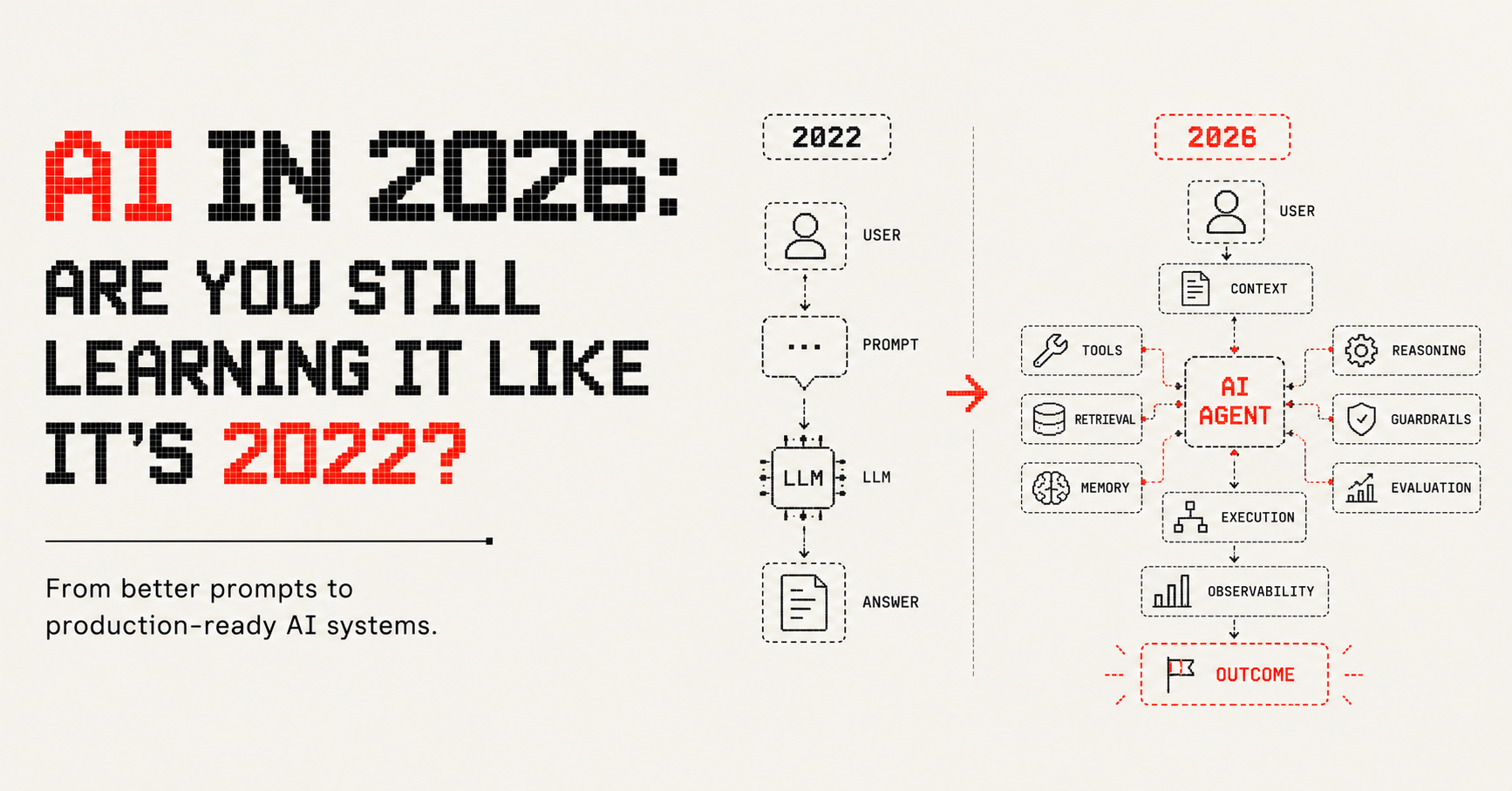
Most people who call themselves "AI engineers" in 2026 can write a great prompt. Fewer of them can explain why their p99 latency spikes under load, why their RAG pipeline confidently cites the wrong document, or why a model that scored 95% on their eval set is hallucinating tool calls in production. That gap is the entire job now.
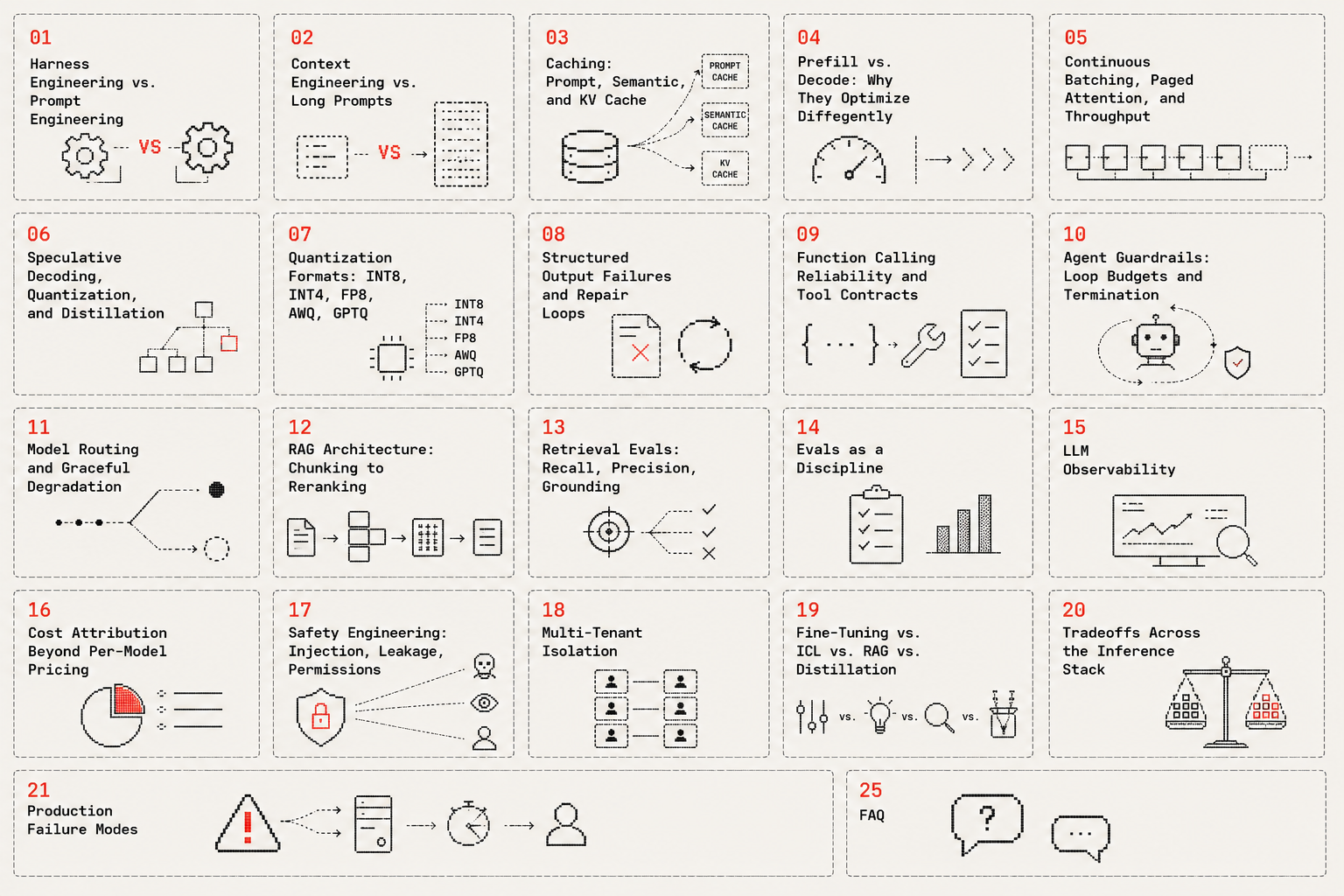
Prompt engineering got you a demo. The rest of this list is what gets you a system that survives contact with real users, real traffic, and real edge cases. This is a working map of that territory — not a definitive textbook, but the vocabulary and mental models you need to stop being surprised by your own systems.
Table of Contents
1. Harness Engineering, Not Just Prompt Engineering
A prompt is one message. A harness is everything around that message: the retry logic, the validation layer, the memory management, the tool-calling loop, the observability hooks, and the fallback paths. Most production failures aren't prompt failures — they're harness failures. The model did roughly what you asked; the system around it didn't know what to do with the answer.
Think of the harness as the difference between a single API call and a piece of infrastructure. A good harness assumes the model will occasionally return malformed output, call the wrong tool, get stuck in a loop, or simply be slow — and has a deterministic plan for each case before it ever happens in production.
Common Mistake: Treating the system prompt as the product. Teams spend weeks tuning prompt wording and zero hours building the retry, validation, and timeout logic that actually determines whether the feature works under real traffic.
Actionable takeaway: Before you optimize prompt wording further, ask whether your harness has explicit handling for timeouts, malformed JSON, tool-call failures, and infinite loops. If the answer is "the model just doesn't usually do that," you don't have a harness — you have hope.
2. Context Engineering, Not Just Long Prompts
Context windows got bigger; that didn't make "dump everything in" a good strategy. Context engineering is the discipline of deciding what goes into the context window, in what order, and when — not just how much.
Long, undifferentiated context degrades performance in well-documented ways: models attend less reliably to information buried in the middle of a long context (the "lost in the middle" effect), latency and cost scale with token count, and irrelevant context actively competes with relevant context for the model's attention. A well-engineered context window is curated, not maximal.
Practically, context engineering means: retrieving only what's relevant (not everything that might be relevant), summarizing or compressing conversation history instead of replaying it verbatim, placing the most decision-critical information near the start or end of the context, and treating system instructions, retrieved documents, tool schemas, and conversation history as separate budgets you manage independently.
Pro Tip: Track your context window like you'd track a memory budget in embedded systems — by section, with hard limits per section, not just a single token ceiling for the whole request.
3. Caching: Prompt Caching vs. Semantic Caching vs. the KV Cache
These three are often conflated and they solve different problems.
Prompt caching (sometimes called context caching) reuses the model provider's internal computation for a prefix of your input that hasn't changed — typically your system prompt, tool definitions, and any static context. It's exact-match on the token sequence: change one character in the cached prefix and the cache misses entirely. It's cheap to reason about and dramatically reduces cost and latency for requests sharing a large static prefix.
Semantic caching is a different layer entirely: it caches responses keyed by the meaning of a query, using embedding similarity rather than exact text match. "What's your refund policy?" and "How do I get my money back?" can hit the same cached answer. This is powerful for high-traffic, repetitive queries, but it's also where teams get burned — semantic similarity isn't the same as semantic equivalence, and a too-loose similarity threshold serves wrong answers with high confidence. Semantic caches need their own evals, not just a similarity cutoff picked by feel.
KV cache is the lowest-level of the three: it's the per-request memory of attention keys and values computed during the forward pass, held so the model doesn't recompute attention over the entire sequence on every new token. This is what actually makes decode fast. At scale, KV cache becomes a memory management problem in its own right — it grows linearly with sequence length and batch size, and on a busy server it competes with every other concurrent request for finite GPU memory.
| Cache Type | What's Cached | Match Type | Primary Benefit | Primary Risk |
|---|---|---|---|---|
| Prompt caching | Static prefix computation | Exact token match | Lower cost/latency on repeated prefixes | Cache miss on any prefix change |
| Semantic caching | Full response | Embedding similarity | Avoids recomputation on near-duplicate queries | Wrong answers from over-loose similarity |
| KV cache | Attention keys/values | Per-request, exact | Fast decode, avoids recomputation per token | Memory pressure, eviction under load |
KV cache eviction and reuse at scale is where this gets operationally serious. Under memory pressure, a serving system has to decide which sequences' KV cache to evict, swap to CPU memory, or recompute from scratch. Naive systems evict whole sequences and force full recomputation; more sophisticated ones (PagedAttention-based servers, for instance) manage KV cache in fixed-size blocks so partial reuse and fine-grained eviction are possible, similar to how an OS manages virtual memory pages.
Did you know? A long-running multi-turn conversation can hold KV cache memory for the entire session, even during idle turns. At scale, this is often the real reason a server can serve fewer concurrent users than its raw compute would suggest — it ran out of memory, not compute.
4. Prefill vs. Decode: Why They Optimize Differently
Every LLM inference request has two distinct phases, and conflating them is a common source of confused latency debugging.
Prefill processes your entire input prompt in parallel — it's compute-bound, highly parallelizable, and its latency scales with input length. This is the phase that determines "time to first token."
Decode generates output tokens one at a time, autoregressively — it's memory-bandwidth-bound, not compute-bound, because each step requires reading the full KV cache and model weights from memory even though it's only producing one token. This is why decode rarely saturates the GPU's compute the way prefill does, and why it's the phase batching helps the most.
| Prefill | Decode | |
|---|---|---|
| Bottleneck | Compute | Memory bandwidth |
| Parallelism | High (whole prompt at once) | Low (sequential, one token at a time) |
| Scales with | Input length | Output length × KV cache size |
| What helps | More compute, larger batches | Batching across requests, faster memory |
| User-facing metric | Time to first token | Tokens per second after first token |
This split is why "make inference faster" isn't one optimization problem — a system optimized purely for prefill throughput can still feel slow to users because decode-phase token generation lags, and vice versa. Long-context, short-answer workloads (e.g., document Q&A) are prefill-dominated; long-generation workloads (e.g., code generation, long-form writing) are decode-dominated. They need different optimization strategies, sometimes even different hardware allocation.
5. Continuous Batching, Paged Attention, and Throughput Optimization
Static batching — waiting for a fixed batch of requests, running them together, returning all results at once — wastes enormous capacity, because requests in a batch finish generating at different lengths, and the whole batch is stuck waiting for the longest one.
Continuous batching (also called in-flight batching) solves this by adding new requests to a running batch as soon as a slot frees up, rather than waiting for the whole batch to complete. This keeps GPU utilization consistently high and is one of the single biggest throughput wins in production LLM serving — it's standard in modern serving frameworks for exactly this reason.
Paged attention addresses the memory-fragmentation side of the same problem. Traditional KV cache allocation reserves a contiguous block sized for the maximum possible sequence length per request, which wastes memory when actual generations are shorter — often dramatically so. Paged attention allocates KV cache in small fixed-size blocks (analogous to OS memory pages), letting the system pack far more concurrent sequences into the same GPU memory and reducing fragmentation-driven waste to near zero.
Expert Insight: Continuous batching and paged attention solve different problems but compound: continuous batching keeps the GPU busy with new work, and paged attention makes more memory available for that work to use. Most modern high-throughput serving stacks need both.
6. Speculative Decoding vs. Quantization vs. Distillation
These are three different ways to make inference faster or cheaper, and they're frequently confused because they're all "make the model run faster" — but they trade off completely different things.
Speculative decoding uses a small, fast "draft" model to generate several candidate tokens ahead of the large model, which then verifies them in a single parallel pass and accepts the ones that match what it would have generated anyway. When the draft model's guesses are good, this can significantly speed up decode without changing the large model's output distribution at all — it's a latency optimization with no quality cost, at the price of needing a second model and added system complexity.
Quantization reduces the numerical precision of model weights (and sometimes activations), shrinking memory footprint and increasing throughput, at some quality cost that depends heavily on the method and the bit-width (more on this below).
Distillation trains a smaller "student" model to mimic a larger "teacher" model's behavior. Unlike the other two, this produces a genuinely smaller, independently deployable model — but it requires a training pipeline, doesn't preserve the teacher's behavior perfectly, and the gap between student and teacher tends to widen on tasks underrepresented in the distillation data.
| Technique | What It Changes | Quality Impact | Infra Complexity | Best For |
|---|---|---|---|---|
| Speculative decoding | Decode speed only | None (exact, when verified) | Needs a draft model + verification logic | Latency-sensitive serving of a large model |
| Quantization | Weight/activation precision | Small to moderate, method-dependent | Moderate (kernel/runtime support) | Memory and cost reduction at serve time |
| Distillation | Model size and architecture | Moderate, task-dependent | High (training pipeline) | Permanently smaller deployable model |
Reality Check: None of these are free. Speculative decoding adds system complexity and a second model to maintain. Quantization can silently degrade quality on tasks you didn't eval. Distillation can take longer to build than it saves in inference cost for low-volume use cases. Pick based on your actual bottleneck — latency, memory, or unit economics — not on which one is trending.
7. Quantization Formats: INT8, INT4, FP8, AWQ, GPTQ — and When Quantization Hurts Quality
Quantization isn't one technique; it's a family, and the format matters as much as the bit-width.
INT8 halves memory versus FP16 with relatively well-understood, modest quality loss for most models — it's the conservative choice. INT4 roughly quarters memory but pushes harder into measurable quality degradation, especially on tasks requiring precise numerical reasoning, long-tail factual recall, or careful instruction-following. FP8 sits between them in a different way: it keeps a floating-point representation (so it handles a wider dynamic range than integer formats at the same bit-width) and is increasingly supported natively in newer GPU hardware, making it attractive for both training and inference.
GPTQ and AWQ are post-training quantization methods, not bit-widths themselves — they're typically applied to get to INT4 or similar low-bit representations while preserving more quality than naive rounding would. GPTQ quantizes weights layer-by-layer, using a calibration dataset to minimize the reconstruction error introduced at each step. AWQ takes a different approach, identifying and preserving a small subset of "salient" weights — the ones with the largest impact on output — at higher precision, while aggressively quantizing the rest.
| Format | Bit-width | Typical Quality Loss | Notes |
|---|---|---|---|
| FP16/BF16 (baseline) | 16-bit | — | Reference point |
| INT8 | 8-bit | Minimal | Safe default for memory savings |
| FP8 | 8-bit | Minimal | Better dynamic range, growing hardware support |
| GPTQ (→INT4) | 4-bit | Moderate | Calibration-based, layer-wise |
| AWQ (→INT4) | 4-bit | Moderate, often slightly better than naive GPTQ | Protects salient weights |
| Naive INT4 (round-to-nearest) | 4-bit | High | Avoid for anything quality-sensitive |
When quantization actually hurts: the failure mode is rarely uniform degradation — it's usually concentrated on specific capabilities. Multi-step arithmetic, precise structured-output formatting, rare-entity factual recall, and instruction-following on long or nested instructions tend to degrade first and most, well before general fluency or conversational quality visibly suffers. This is why "the demo still looks fine" is a dangerous quantization sign-off criterion — you need task-specific evals, not vibes, before shipping a quantized model.
Warning: A quantized model that passes your chatbot smoke test can still fail silently on structured extraction or tool-argument generation. Always re-run your hardest, most format-sensitive evals after quantizing — not just your general quality suite.
8. Structured Output Failures, Schema Validation, Repair Loops, and Fallback Chains
Any system that asks a model to return JSON (or any structured format) will, eventually, get back something that doesn't parse. Trailing commas, truncated output, an extra field invented because it seemed helpful, a string where a number was expected. This isn't a rare edge case at scale — it's a predictable, recurring failure mode that needs an explicit handling strategy, not a try/except that silently fails.
A robust structured-output pipeline typically layers several defenses:
def get_structured_output(prompt, schema, max_repair_attempts=2):
    response = call_model(prompt, response_format=schema)

    for attempt in range(max_repair_attempts):
        try:
            parsed = json.loads(response)
            validate(parsed, schema)  # e.g. jsonschema.validate
            return parsed
        except (json.JSONDecodeError, ValidationError) as e:
            # Repair loop: show the model its own broken output and the error
            repair_prompt = build_repair_prompt(response, str(e), schema)
            response = call_model(repair_prompt, response_format=schema)

    # Fallback chain: degrade gracefully instead of failing the request
    return fallback_extraction(response) or default_safe_response(schema)
The repair loop — feeding the model its own malformed output along with the specific validation error — recovers a large share of failures, because the model usually "knows" how to fix a JSON error once it's pointed at exactly which one occurred. But repair loops need a hard cap; an unbounded repair loop is just a slower, more expensive way to fail.
The fallback chain is what happens after repair attempts are exhausted: a regex-based best-effort extraction, a smaller/cheaper model as a backup parser, or a safe default response — anything other than surfacing a raw exception to the user or, worse, silently returning malformed data downstream.
Pro Tip: Use constrained decoding (grammar-based or schema-based output constraints) wherever your serving stack supports it. It eliminates an entire class of structured-output failures at the source instead of catching them after the fact — though it's not available everywhere, and it can subtly change output quality if the constraint is too rigid for the task.
9. Function Calling Reliability, Tool Contracts, Argument Validation, and Idempotency
Function calling looks deceptively simple in a demo: model decides to call a tool, generates arguments, tool executes. In production, every one of those steps fails in characteristic ways.
Tool contracts need to be treated like API contracts, because that's what they are. A tool's name, description, and parameter schema are the prompt the model sees for deciding whether and how to call it — vague descriptions produce vague (or wrong) tool selection, and ambiguous parameter names produce malformed arguments. Tool descriptions deserve the same care as system prompts, not an afterthought.
Argument validation has to happen before execution, every time, regardless of how reliable the model has seemed in testing. Validate types, ranges, and required fields against the schema; reject (and ideally trigger a repair loop on) anything that doesn't match, rather than passing model-generated arguments straight into a database query or an external API call.
Idempotency matters because retries are unavoidable — networks fail, models time out, repair loops re-call tools. If a tool call charges a credit card, sends an email, or creates a record, it needs an idempotency key (often generated per logical action, not per retry attempt) so a retried call doesn't double-execute a side effect. This is the same discipline used in payment systems, applied to agent tool calls for the same reason: at scale, "it probably won't retry" is not a plan.
Common Mistake: Giving an agent a tool that has irreversible side effects (sending an email, deleting a record, making a purchase) without a confirmation step, a dry-run mode, or an idempotency guarantee. The first time it works fine. The first time it doesn't, it's a real-world incident, not a bug ticket.
10. Agent Guardrails: Loop Budgets, Tool Budgets, and Termination Conditions
Agentic loops — plan, act, observe, repeat — have no natural stopping point built into the model. Left unconstrained, an agent can call the same tool repeatedly, get stuck in a reasoning loop, or simply keep "trying again" indefinitely when a task isn't actually solvable with its available tools.
Production agent harnesses need explicit, hard-coded budgets, not model-decided ones:
Loop/step budget — a maximum number of plan-act-observe cycles per task, after which the agent must stop and report, not silently continue.
Tool-call budget — a maximum number of calls to a given tool (and often a global maximum across all tools) per task, to bound both cost and the blast radius of a misbehaving loop.
Wall-clock budget — a maximum total execution time, independent of step count, because some loops burn time without burning many discrete steps.
Explicit termination conditions — success criteria the harness can check programmatically (not just "the model said it's done"), plus a defined "I can't complete this" exit path that returns control to a human rather than looping indefinitely.
Mini Case Study: A common runaway pattern: an agent calls a search tool, gets an empty or unhelpful result, and — because nothing in its instructions says otherwise — calls the same search again with a marginally reworded query, repeatedly, until it hits a token or time limit. The fix isn't a smarter model; it's a harness rule that detects repeated near-identical tool calls and forces a different strategy or a hard stop.
11. Model Routing, Graceful Fallback Logic, and Degraded-Mode UX
Most production systems don't run on a single model for every request. Model routing sends different requests to different models based on complexity, cost sensitivity, latency requirements, or task type — a simple classification or summarization task might route to a small, fast model, while a complex multi-step reasoning task routes to a larger one.
Graceful fallback is what happens when the primary choice — whether that's a specific model, provider, or region — is unavailable, rate-limited, or too slow. A well-designed fallback chain tries a backup model or provider, ideally one trained or prompted to behave similarly enough that the user doesn't notice a quality cliff, rather than failing the request outright.
Degraded-mode UX is the product design half of this: deciding what the user actually sees when the system is operating in a fallback or reduced-capability state. The wrong approach is silence — pretending nothing changed while quietly serving a worse model or a cached, stale answer. The better approach is honest, low-friction signaling: a visible "running in reduced mode" indicator, a slightly different response style that doesn't claim more confidence than the fallback path can support, or a clear option to retry once the primary path recovers.
Reality Check: Routing logic is itself a reliability surface. A routing layer that misclassifies request complexity sends simple requests to expensive models (a cost problem) or complex requests to models that can't handle them (a quality problem) — and because routing decisions happen before generation, routing bugs are invisible in your output-quality evals unless you specifically test the router.
12. RAG Architecture: Chunking, Embeddings, Hybrid Search, Reranking, and Freshness
Retrieval-augmented generation has more moving parts than its three-letter name suggests, and most RAG quality problems trace back to one of these stages rather than to the generation step itself.
Chunking decides how source documents are split before indexing. Chunks too large dilute relevance (a chunk might be 90% irrelevant to the one sentence that matters); chunks too small lose context (a fact split across a chunk boundary becomes unretrievable as a coherent unit). Effective chunking is usually structure-aware — splitting along headings, paragraphs, or semantic boundaries rather than a fixed character count — and often uses overlap between adjacent chunks specifically to avoid splitting key facts across a hard boundary.
Embeddings turn chunks (and queries) into vectors for similarity search. The choice of embedding model affects retrieval quality directly, and a model trained on general web text won't necessarily capture domain-specific similarity well — a legal or medical RAG system often needs a domain-tuned or fine-tuned embedding model to retrieve well.
Hybrid search combines dense vector similarity with traditional sparse/keyword search (like BM25), because they fail in complementary ways: vector search is strong on semantic similarity but weak on exact terms (product codes, names, acronyms), while keyword search is the reverse. Most production-grade RAG systems use both and merge the results, rather than relying on vector search alone.
Reranking adds a second-stage model that re-scores the initial retrieved set (often the top 20–50 candidates) for relevance to the specific query, using a model better suited to fine-grained relevance judgment than the first-pass retriever. This step alone is often the single highest-leverage RAG quality improvement teams skip, because it's "extra latency" — but a reranked top-5 is frequently far more relevant than an unreranked top-5.
Freshness is the dimension RAG architecture diagrams routinely ignore: how does the index stay current as source documents change? A RAG system answering questions from a stale index will confidently retrieve and cite outdated information with no signal to the user that anything is wrong. Index update cadence, change detection, and a strategy for handling queries about very recent events (which the index may not yet contain) all need to be explicit design decisions, not afterthoughts.
Did you know? A RAG system can have a great generation model and still produce bad answers entirely because of retrieval — if the right document never makes it into the top-k retrieved chunks, no amount of generation quality recovers it. Most RAG debugging time should go into retrieval, not the prompt.
13. Retrieval Evals: Recall, Precision, Grounding, Attribution, and Citation Quality
You cannot improve what you don't measure, and "the answers look good" is not a retrieval eval. A real retrieval eval suite separates several distinct questions:
Recall — of all the chunks that actually contain information relevant to the query, what fraction did retrieval surface? Low recall means the right information exists in your corpus but never reaches the model.
Precision — of the chunks retrieval surfaced, what fraction were actually relevant? Low precision means the model is wading through noise, which both wastes context budget and increases the odds it latches onto an irrelevant chunk.
Grounding — does the generated answer actually rely on the retrieved content, or did the model fall back on its parametric knowledge (and potentially hallucinate) despite retrieval providing the right information? A model can retrieve perfectly and still ignore what it retrieved.
Attribution — when an answer cites a source, does the cited source actually support the claim made? This is distinct from grounding: a model can be "grounded" in the sense of using retrieved content while still misattributing a claim to the wrong specific source.
Citation quality combines attribution with usefulness — citations that are technically accurate but point to an entire long document rather than the specific relevant passage aren't actually helping the user verify the claim.
| Eval Dimension | Question It Answers | Common Failure Without It |
|---|---|---|
| Recall | Did we retrieve the right information at all? | Right answer exists in corpus, never surfaces |
| Precision | Is retrieved content actually relevant? | Context window full of noise |
| Grounding | Did generation actually use retrieval? | Hallucination despite correct retrieval |
| Attribution | Are citations accurate? | Confidently wrong source citations |
| Citation quality | Are citations specific and useful? | Technically correct but unverifiable citations |
14. Evals as a Discipline: Golden Sets, Regression Tests, Adversarial Tests, LLM-as-Judge, and Human Evals
Evals are not a one-time pre-launch checklist; they're the testing infrastructure for a system whose behavior shifts every time you change a prompt, a model version, a retrieval index, or a tool definition.
A golden set is a curated, version-controlled set of representative inputs with known-good (or known-acceptable) outputs, used as the baseline for measuring quality changes. It needs to actually represent production traffic distribution, not just the easy cases a team thinks of first.
Regression tests run the golden set (and ideally a set of previously-found failure cases) against every meaningful change — prompt edit, model swap, retrieval change — to catch quality regressions before they ship, the same way unit tests catch code regressions.
Adversarial tests deliberately probe for failure: prompt injection attempts, edge-case inputs, ambiguous instructions, and inputs specifically designed to trigger known failure modes (malformed tool calls, hallucinated citations, guardrail bypass attempts). These should be treated as a permanent, growing suite — every production incident should add a new adversarial test case so the same failure can't ship twice.
LLM-as-judge uses a model (often a stronger one than the one being evaluated) to score outputs against a rubric, which scales far better than human review for large eval sets — but it has known biases (a tendency to favor longer or more confident-sounding answers, for instance) and needs its own calibration against human judgment before being trusted as ground truth.
Human evals remain necessary specifically because LLM-as-judge inherits the blind spots of whatever model is doing the judging. A subset of outputs — especially ambiguous or high-stakes ones — should always go through human review, both to catch what automated evals miss and to periodically recalibrate the LLM-judge's rubric against human standards.
Expert Insight: The most dangerous eval failure isn't a low score — it's a silent regression that golden-set evals don't catch because the golden set doesn't cover the input distribution where the regression occurred. This is why production traffic sampling into your eval set, not just hand-picked test cases, matters as the system matures.
15. LLM Observability as a First-Class Discipline
Traditional application observability tracks requests, errors, and latency. LLM observability needs an additional layer, because the unit of work isn't a single function call — it's a chain of model calls, tool calls, and retrieval steps, each with its own cost, latency, and failure modes.
A useful LLM observability setup captures, per request: traces — the full chain of steps a request took (retrieval → generation → tool call → repair loop → final response), so a slow or wrong answer can be traced back to exactly which step caused it; spans — the individual timed steps within a trace, each with its own duration and outcome; token counts — input and output tokens per step, since cost and latency both scale with tokens in ways a simple request-count metric hides; latency breakdown — time to first token versus total generation time versus tool-execution time, since these have different causes and different fixes; errors — not just hard failures, but soft failures like a structured-output validation failure that triggered a repair loop, since these are leading indicators of degrading reliability even when the user-facing request eventually succeeded; and drift — gradual shifts in output characteristics (length, refusal rate, tool-call frequency, latency distribution) over time, often the first signal of an upstream model version change, a prompt regression, or a shift in input distribution.
Pro Tip: If your only LLM observability signal is "request succeeded or failed," you're blind to the most common production problem: requests that technically succeed but are quietly getting worse — slower, more expensive, more often relying on repair loops or fallback paths — well before they start failing outright.
16. Cost Attribution Per Feature, Workflow, Tenant, and User Journey — Not Just Per Model
A single "total LLM spend" number is close to useless for decision-making. The actionable version of cost observability breaks spend down by the dimensions that map to actual decisions: per feature, so you know whether your summarization feature or your chat assistant is driving cost, and can make a build/optimize/cut decision per feature rather than across the whole system; per workflow, since a single user action (like "generate a report") might trigger a chain of model calls, retrieval steps, and repair loops whose combined cost is invisible if you're only looking at individual API calls; per tenant, essential for any multi-tenant or B2B product, both for margin analysis per customer and for catching a single tenant whose usage pattern (or misuse) is driving disproportionate cost; and per user journey, tracking cost across an entire session or task rather than per request, since retry loops, repair attempts, and fallback chains can multiply the effective cost of a single user-visible interaction well beyond what a per-request average would suggest.
Common Mistake: Optimizing model choice for per-token price while ignoring that a cheaper model with a higher repair-loop or retry rate can end up costing more per successfully completed task than a more expensive model that gets it right the first time.
17. Safety Engineering: Prompt Injection Defense, Data Leakage Prevention, and Permission Boundaries
Prompt injection — malicious or manipulative instructions embedded in content the model processes (a document, a webpage, a tool result) that attempt to override the system's actual instructions — is a structural risk wherever a model processes untrusted content alongside trusted instructions. Defense isn't a single fix; it's layered: clearly separating trusted instructions from untrusted content in the prompt structure, treating any instruction-like text inside retrieved or tool-returned content as data rather than as a command, validating and constraining what actions a model can take as a result of processing untrusted content (especially anything irreversible), and monitoring for the behavioral signatures of successful injection (unexpected tool calls, sudden instruction-following changes mid-conversation).
Data leakage prevention covers both directions: making sure a model doesn't surface information from one user's data, document set, or conversation history to another, and making sure sensitive information (credentials, internal system details, other users' data accidentally present in shared context) doesn't get echoed back in model output even when it technically had access to it during processing.
Permission boundaries mean the model's available tools and data access should be scoped to the minimum needed for the current request and the current user — not a single set of maximally-permissioned tools shared across every context. An agent acting on behalf of a low-privilege user should not have access to tools or data scoped for an admin, regardless of what the conversation seems to be asking for.
Warning: "The model usually refuses harmful instructions embedded in documents" is not a safety control — it's an observation about typical behavior that adversarial inputs are specifically designed to defeat. Permission boundaries and content-source separation need to hold even when the model's judgment doesn't.
18. Multi-Tenant Isolation, Cache Safety, and Cross-User Context Contamination Prevention
Every caching and optimization technique covered earlier introduces a multi-tenant risk if implemented carelessly. A semantic cache keyed only on query similarity, without a tenant or user scope in the cache key, can serve one customer's cached response — potentially containing details specific to their account — to a different customer who asked a similar-sounding question. A KV cache or context-reuse optimization that isn't carefully scoped per session can, in the worst case, leak fragments of one user's conversation into another's.
The general principle: every cache, every batched request, and every shared piece of infrastructure needs an explicit tenant or user boundary baked into its key structure and access logic — never an implicit assumption that "requests are processed independently" will hold under whatever optimization gets added next. This matters most precisely when it's least visible: a cache-sharing bug doesn't show up in normal testing, because normal testing doesn't usually have two different tenants asking near-identical questions in close succession the way real concurrent production traffic does.
Reality Check: Cross-tenant contamination bugs are disproportionately likely to be introduced by performance optimizations, not by core feature logic — because performance work is where shared caches, shared batches, and shared context get added, often by an engineer focused on throughput who isn't thinking about isolation at all.
19. Fine-Tuning vs. In-Context Learning vs. RAG vs. Distillation — and When Each Is the Wrong Tool
These four are frequently treated as a single "make the model better at X" decision when they actually answer different questions.
Fine-tuning changes model weights to better match a task, style, or domain through additional training. It's the right tool when you need consistent behavior on a well-defined task at scale (where the per-request cost of a long prompt becomes prohibitive), or when you need a specific output format or style baked in rather than instructed every time. It's the wrong tool for knowledge that changes frequently — fine-tuning bakes in a snapshot, and updating it means retraining, which is slow and expensive compared to updating a retrieval index.
In-context learning (ICL) — providing examples or instructions directly in the prompt — is the right tool for tasks that vary per request, for rapid iteration (no training cycle needed), and for situations where you need the reasoning to be transparent and inspectable in the prompt itself. It's the wrong tool at scale for tasks where the same lengthy instructions and examples are repeated on every single request, since that's pure recurring cost that fine-tuning would eliminate.
RAG is the right tool when the model needs access to specific, current, or proprietary knowledge that isn't (and shouldn't be) baked into model weights — and especially when that knowledge needs to be updatable without retraining, and when you need source attribution for generated claims. It's the wrong tool when the task is actually about behavior or style rather than knowledge — RAG can give a model the right facts and still produce output in the wrong format or tone, because retrieval doesn't change how the model writes.
Distillation is the right tool when you've validated that a large model performs well on a task and now need that capability at lower cost or latency, repeatedly, at scale. It's the wrong tool as a first step — distilling before you know the target behavior is correct just gets you a smaller model that's confidently wrong in the same ways, faster and cheaper.
| Need | Best Fit | Why the Others Fall Short |
|---|---|---|
| Current, updatable, attributable knowledge | RAG | Fine-tuning bakes in a stale snapshot; ICL doesn't scale per-request cost |
| Consistent format/style/behavior at scale | Fine-tuning | ICL repeats instructions every request; RAG doesn't address style |
| Fast iteration, per-request variability | ICL | Fine-tuning's training cycle is too slow to iterate against |
| Lower cost/latency on a validated task | Distillation | Fine-tuning alone doesn't necessarily reduce model size |
A surprising number of production systems should be using two or three of these together — RAG for current knowledge plus a lightly fine-tuned model for consistent output format, for instance — rather than treating the choice as exclusive.
20. Latency, Quality, Cost, and Reliability Tradeoffs Across the Full Inference Stack
Almost every technique covered above is a tradeoff along these four axes, and the honest version of "which is best" is "best for which axis, at what cost to the others." Bigger models generally improve quality and reliability while worsening latency and cost. Quantization improves latency and cost while risking quality, particularly on precision-sensitive tasks. Speculative decoding improves latency at essentially no quality cost but adds system complexity (a reliability and engineering-cost tradeoff that doesn't show up on the quality/latency/cost triangle at all). RAG improves quality and reduces hallucination-driven unreliability, at the cost of added latency (retrieval is not free) and added system complexity. Aggressive caching improves latency and cost dramatically, at the risk of reliability and correctness if cache invalidation or scoping is wrong.
The practical implication: there is no single "optimized" configuration. A system optimized for a real-time chat interface (where time-to-first-token dominates user experience) will make different tradeoffs than a system optimized for a batch document-processing pipeline (where total throughput and cost per document dominate, and an extra second of latency is invisible). Define which axis is actually load-bearing for your specific product before optimizing any of them.
Pro Tip: Write down your actual latency, cost, and quality requirements as numbers — not as "fast" and "cheap" and "good" — before evaluating any of these techniques. Vague requirements lead to optimizing the axis that's easiest to measure (usually cost) at the expense of the one that actually matters to users (usually latency or reliability).
21. Production Failure Modes: Hallucinated Tool Calls, Malformed JSON, Stale Retrieval, Runaway Agents, and Silent Eval Regressions
These are the failures that show up after launch, not during testing — each with a distinct signature and a distinct fix.
Hallucinated tool calls happen when a model invents a plausible-sounding tool name or parameter that doesn't exist in its actual tool set, usually under ambiguous instructions or when the right tool genuinely isn't available for the task. The fix is rarely a better prompt; it's strict validation that rejects any tool call referencing an undefined tool or parameter before it ever reaches execution, plus a clear, harness-level "no suitable tool available" fallback path the model can take instead.
Malformed JSON at scale is rarely a single bug — it's a statistical tail that shows up reliably under specific conditions: outputs near the model's max-token limit (truncated mid-structure), unusual or edge-case input data, and certain prompt-schema combinations more than others. The fix is the structured-output repair loop and fallback chain covered earlier, treated as permanent infrastructure rather than a temporary patch.
Stale retrieval is RAG serving outdated information from an index that hasn't caught up with source changes — and it's particularly dangerous because the output looks exactly as confident and well-cited as a correct answer. The fix is explicit index freshness monitoring and, for time-sensitive domains, a visible recency indicator or a routing rule that flags queries likely to need very recent information.
Runaway agents loop, retry, or escalate tool usage without making progress, usually because the harness has no concept of "this approach isn't working, try something else" — only "keep trying." Loop budgets and tool-call budgets (covered in the guardrails section) are the direct fix, but the deeper fix is detecting unproductive repetition specifically, not just capping total steps, since a capped-but-unproductive loop still burns the entire budget without succeeding.
Silent eval regressions are the most insidious of these, because by definition nothing alerts you — quality degrades on a slice of traffic your golden set doesn't cover, or degrades gradually enough that no single deploy looks like a clear regression. The only real defense is continuous production sampling into your eval pipeline (not just pre-deploy testing) and tracking quality metrics as a time series, not a one-time pass/fail gate.
Reality Check: Every failure mode in this section has the same root cause: treating the model's typical behavior as if it were guaranteed behavior. The entire discipline of production AI engineering is building systems that work correctly when the model does something atypical — because at scale, atypical happens constantly.
Summary: The Mental Model Shift
| Prompt Engineer's Question | AI Engineer's Question |
|---|---|
| What should I ask the model? | What happens when the model's answer is malformed, wrong, slow, or stuck in a loop? |
| Does this prompt produce good output? | Does this system produce good output reliably, at scale, under cost and latency constraints, across tenants, when something fails? |
| Is the model good enough? | Is the system — model, harness, retrieval, cache, observability, guardrails — good enough? |
None of these topics is optional once a system has real users. They're not advanced add-ons to bolt on later — they're the actual job description, and the prompt is the smallest part of it.
Where to Go Next
If you're building or maintaining a production LLM system right now, the highest-leverage starting points from this list are usually: get structured-output validation and a repair loop in place if you don't have one, add per-feature and per-tenant cost attribution if you're only tracking total spend, and build a golden eval set sampled from real production traffic rather than hand-picked examples. Everything else compounds from there.
What's the failure mode that's actually bitten you in production — caching bugs, runaway agents, silent quality drift, something else? That's usually the most useful place to go deep next.
FAQ
What's the difference between a prompt and a harness? A prompt is the instructions sent to the model in a single request. A harness is the surrounding system — retries, validation, tool-calling logic, fallback paths, observability — that determines whether a real application works reliably, not just whether a single demo call succeeds.
Why does context engineering matter if context windows are huge now? Larger context windows don't fix attention degradation on irrelevant or poorly-ordered information, and every additional token still costs latency and money. Curating what enters the context window remains necessary regardless of window size.
Is semantic caching safe to use for factual or account-specific answers? Only with a tight similarity threshold, careful tenant/user scoping in the cache key, and its own eval suite — a too-loose threshold or missing scope can serve a wrong or cross-user answer with full confidence.
What actually determines time-to-first-token? Mostly the prefill phase, which scales with input prompt length and is compute-bound. Long input context increases time-to-first-token even if the expected output is short.
Does continuous batching change model output? No — it changes how requests are scheduled on the GPU, not what the model computes for any individual request. It's a throughput optimization, not a quality-affecting one.
Is speculative decoding ever a quality risk? When implemented correctly with proper verification, no — outputs match what the large model would have generated unassisted. The cost is added system complexity, not quality.
Which quantization format should I start with? INT8 or FP8 for a conservative first step with minimal quality risk. Move to INT4 (via AWQ or GPTQ rather than naive rounding) only after running task-specific evals, particularly on structured output and numerical reasoning.
Why does quantization sometimes look fine in testing but fail in production? General-quality smoke tests often don't stress the specific capabilities (precise formatting, numerical reasoning, rare-entity recall) that degrade first under quantization. Production traffic eventually hits those cases even if your test set didn't.
How many repair attempts should a structured-output retry loop allow? Typically one to three. Beyond that, failures usually aren't going to self-correct, and you're better off falling back to a deterministic extraction method or a safe default response.
What's the difference between a tool contract and a tool description? A tool contract is the full agreement — name, parameter schema, validation rules, expected side effects, and idempotency behavior. The description is just the natural-language part the model reads to decide when to call it. Both need to be precise.
Why do agents need a tool-call budget separate from a step budget? A single step can trigger multiple tool calls, and a misbehaving loop can rack up cost or side effects through repeated tool calls within what looks like a small number of reasoning steps. Capping both independently closes that gap.
How do you decide when to fall back to a smaller model versus failing the request? Generally based on the cost of a wrong or degraded answer versus the cost of no answer. For low-stakes, latency-sensitive use cases, a degraded fallback is usually better; for high-stakes outputs (financial, medical, legal-adjacent), a clear failure with an honest message is often safer than a confident but lower-quality fallback answer.
Is reranking always worth the added latency in a RAG pipeline? For most production use cases, yes — the relevance improvement from reranking the initial retrieved set is one of the highest-leverage RAG changes available, and the added latency (typically tens to low hundreds of milliseconds) is usually small relative to generation time.
What's the difference between grounding and attribution in retrieval evals? Grounding asks whether the model actually used retrieved content rather than relying on parametric memory. Attribution asks whether a specific cited source actually supports the specific claim made — a model can be grounded but still misattribute a true claim to the wrong source.
Why isn't LLM-as-judge sufficient on its own? It inherits the blind spots and biases of whichever model is judging — including systematic preferences (like favoring longer or more confident answers) that don't track actual quality. Periodic human evals are needed to catch and recalibrate for that.
What's the single most common LLM observability gap? Tracking only hard failures (the request errored out) while missing soft-failure signals — repair-loop triggers, fallback-path usage, rising latency — that indicate degrading reliability well before outright failures appear.
Why break down cost per workflow instead of per API call? A single user action can trigger many chained model calls, retries, and repair attempts. Per-call cost tracking misses the true cost of completing one user-visible task, which is what actually matters for unit economics.
What's the most overlooked prompt injection risk? Treating instruction-like text inside retrieved documents or tool results as untrusted is necessary but often missed — teams secure the system prompt carefully while forgetting that any content the model later reads can also try to issue instructions.
How do cross-tenant cache bugs typically get introduced? Almost always through performance optimizations — a cache, batch, or shared context structure added to improve throughput, where tenant or user scoping wasn't built into the key from the start.
Should I always choose RAG over fine-tuning? No — they solve different problems. RAG is for current, updatable, attributable knowledge; fine-tuning is for consistent behavior, format, or style at scale. Many production systems need both, not one instead of the other.
Comments
Join the discussionNo comments yet. Be the first to comment.