FastAPI + LangChain + Docker: My Blueprint for Shipping LLM Microservices to Production
A working architecture I actually run — not a tutorial that stops at "it works on my laptop."

The problem nobody warns you about
Every LLM demo looks the same. A notebook, one API call, a clean prompt, a great answer. Everyone claps.
Then someone says "let's ship it," and that's where most projects quietly die.
Because a notebook doesn't have:
200 concurrent users hitting it at once
An LLM provider that times out or rate-limits you mid-response
A bill that triples because nothing is cached
A way to know why an answer was wrong three days later
A deploy process that doesn't involve someone's laptop
The gap between "the model works" and "the service is production-ready" is where most of the real engineering happens — and it's also where most people never go. That's the part I want to walk you through.
This is the exact stack I reach for when I need to turn an LLM prototype into something that survives real traffic: FastAPI as the front door, LangChain as the orchestration layer, and Docker to package and ship it. Below is the architecture, the code, and the three mistakes that taught me the hard way.
What you'll walk away with
A production architecture for LLM microservices (with a diagram, not just words)
Streaming FastAPI endpoints that don't block under load
A LangChain setup with semantic caching and automatic provider fallback
A Docker + Kubernetes deployment path that actually ships
A short FAQ for the questions I get asked most about this stack
Grab a coffee — this is a 7-minute read.
The architecture, end to end
Here's the shape of the system before we get into any code:
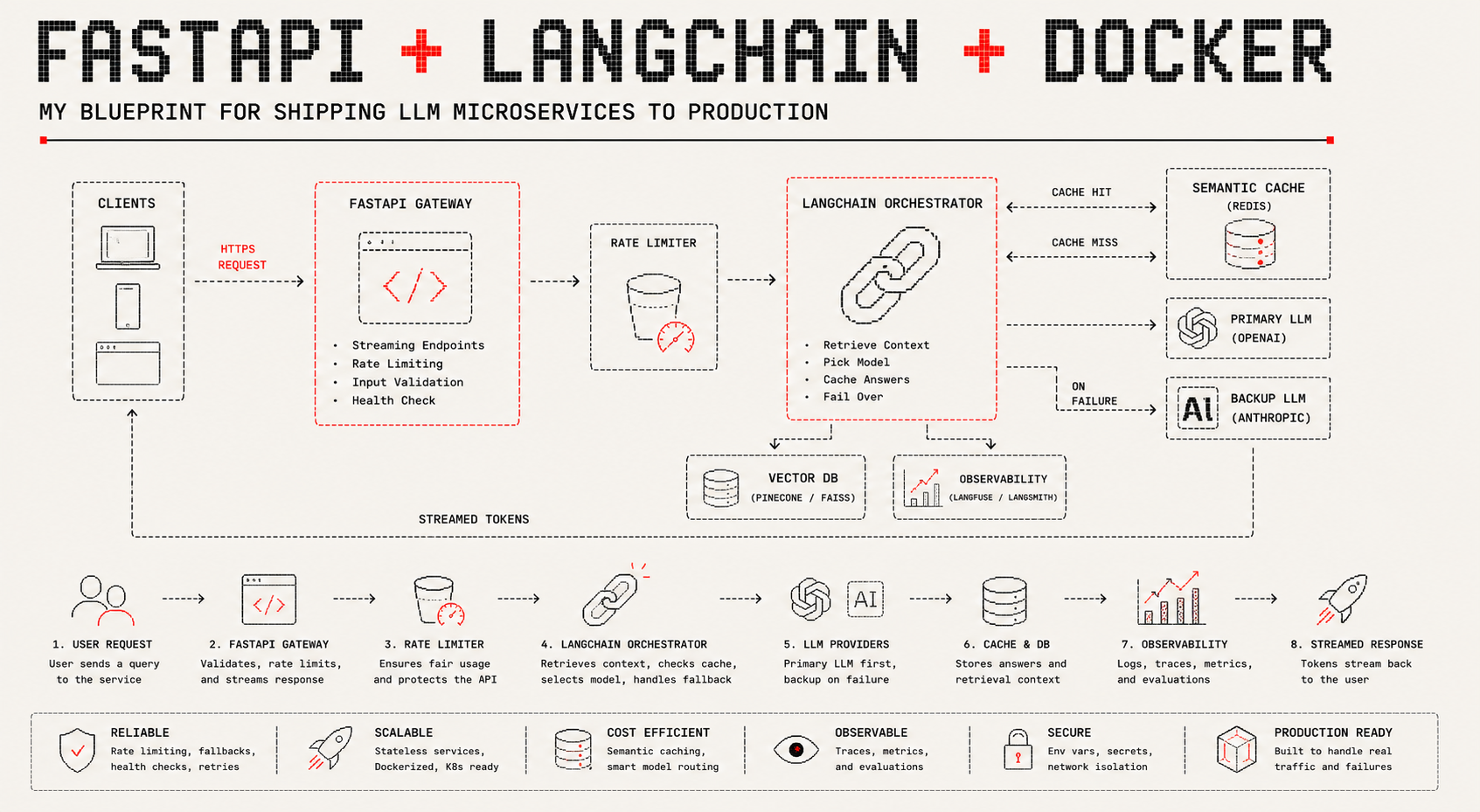
Four layers, four jobs:
FastAPI — accepts requests, streams responses, enforces rate limits, stays alive under load
LangChain — decides what to do: retrieve context, pick a model, cache the answer, fail over if a provider drops
Docker — packages all of it into something identical in dev, staging, and prod
Observability — the layer everyone skips, and the one that saves you at 2 AM
Let's go layer by layer.
Layer 1: FastAPI — the front door
The front door has one job: never make the user wait for the entire answer before they see anything. That means streaming, not blocking.
# main.py
from fastapi import FastAPI
from fastapi.responses import StreamingResponse
from pydantic import BaseModel

from chain import get_chain

app = FastAPI(title="LLM Gateway")


class ChatRequest(BaseModel):
    query: str
    session_id: str


@app.post("/chat")
async def chat(req: ChatRequest):
    chain = get_chain(req.session_id)

    async def token_stream():
        async for chunk in chain.astream({"input": req.query}):
            if chunk.content:
                yield chunk.content

    return StreamingResponse(token_stream(), media_type="text/event-stream")


@app.get("/healthz")
async def health():
    return {"status": "ok"}
A few small details here do a lot of work:
astream, notinvoke— the client sees the first token in ~200ms instead of waiting 8 seconds for the full response./healthz— this one endpoint is what lets Kubernetes, load balancers, and your on-call self know the service is actually alive, not just running.Pydantic models on input — malformed requests get rejected before they ever reach an LLM call you'd otherwise pay for.
Rate limiting sits right next to this — I use a simple per-session token bucket so one noisy user can't eat your entire LLM budget in a minute.
Layer 2: LangChain — the orchestration brain
This is where "calling an API" turns into "a system that behaves predictably." Two things matter most here: caching and fallbacks.
# chain.py
from langchain_openai import ChatOpenAI, OpenAIEmbeddings
from langchain_anthropic import ChatAnthropic
from langchain_core.output_parsers import StrOutputParser
from langchain_core.prompts import ChatPromptTemplate
from langchain.globals import set_llm_cache
from langchain_community.cache import RedisSemanticCache

import os

# Cache semantically similar questions, not just exact string matches
set_llm_cache(
    RedisSemanticCache(
        redis_url=os.environ["REDIS_URL"],
        embedding=OpenAIEmbeddings(),
        score_threshold=0.15,
    )
)

primary = ChatOpenAI(model=os.environ["PRIMARY_MODEL"], temperature=0.2, timeout=15)
backup = ChatAnthropic(model=os.environ["BACKUP_MODEL"], temperature=0.2, timeout=15)

# If the primary provider times out, rate-limits, or errors — fail over automatically
llm = primary.with_fallbacks([backup])

prompt = ChatPromptTemplate.from_messages([
    ("system", "You are a precise, production support assistant. Answer only from the given context."),
    ("human", "{input}"),
])


def get_chain(session_id: str):
    return prompt | llm | StrOutputParser()
Why this matters more than it looks:
Semantic caching catches the "same question, different words" problem. In most support and internal-tool use cases, a large share of queries are near-duplicates — caching them is often the single biggest cost lever you have, well before you touch the model itself.
.with_fallbacks()means one provider having a bad afternoon doesn't take your whole service down with it. This is a five-line change that removes a single point of failure.Model names come from environment variables, never hardcoded. Model versions change often — your deployment shouldn't require a code change every time one does.
If you're doing RAG, this is also where your retriever slots in before the prompt — same pattern, one more step in the chain.
Layer 3: Docker — packaging it so it actually ships
A prototype that only runs on your machine isn't shippable. The image needs to be small, reproducible, and safe to run as a non-root user.
# ---- builder stage ----
FROM python:3.12-slim AS builder
WORKDIR /app

RUN pip install --no-cache-dir uv
COPY pyproject.toml uv.lock ./
RUN uv export --no-dev --format requirements-txt > requirements.txt
RUN pip install --no-cache-dir --target=/install -r requirements.txt

# ---- runtime stage ----
FROM python:3.12-slim
WORKDIR /app

RUN useradd --create-home --uid 1000 appuser
COPY --from=builder /install /usr/local/lib/python3.12/site-packages
COPY . .
USER appuser

EXPOSE 8000
HEALTHCHECK --interval=30s --timeout=5s \
  CMD python -c "import urllib.request; urllib.request.urlopen('http://localhost:8000/healthz')" || exit 1

CMD ["uvicorn", "main:app", "--host", "0.0.0.0", "--port", "8000", "--workers", "2"]
For local development, docker-compose gives you the whole system with one command:
# docker-compose.yml
version: "3.9"
services:
  api:
    build: .
    ports: ["8000:8000"]
    env_file: .env
    depends_on: [redis]

  redis:
    image: redis:7-alpine
    ports: ["6379:6379"]
The multi-stage build matters more than it seems — it keeps build tools out of the final image, which means a smaller image, a smaller attack surface, and faster cold starts when Kubernetes spins up a new pod under load.
Getting it into production
Packaging is only half the job. Here's the path from a merged pull request to a running pod:

A trimmed-down deployment, with the two things people forget most — resource limits and probes:
apiVersion: apps/v1
kind: Deployment
metadata:
  name: llm-gateway
spec:
  replicas: 3
  selector:
    matchLabels: { app: llm-gateway }
  template:
    metadata:
      labels: { app: llm-gateway }
    spec:
      containers:
        - name: llm-gateway
          image: registry.example.com/llm-gateway:1.4.0
          ports: [{ containerPort: 8000 }]
          resources:
            requests: { cpu: "250m", memory: "256Mi" }
            limits: { cpu: "1", memory: "512Mi" }
          readinessProbe:
            httpGet: { path: /healthz, port: 8000 }
            initialDelaySeconds: 5
          livenessProbe:
            httpGet: { path: /healthz, port: 8000 }
            initialDelaySeconds: 15
---
apiVersion: autoscaling/v2
kind: HorizontalPodAutoscaler
metadata:
  name: llm-gateway-hpa
spec:
  scaleTargetRef: { apiVersion: apps/v1, kind: Deployment, name: llm-gateway }
  minReplicas: 2
  maxReplicas: 10
  metrics:
    - type: Resource
      resource: { name: cpu, target: { type: Utilization, averageUtilization: 65 } }
Without resources set, one bad request can let a single pod eat the whole node's memory. Without probes, Kubernetes will happily send traffic to a pod that's already stuck. Both are one-line fixes with an outsized payoff.
Last piece: observability isn't optional for LLM services. A tool like Langfuse or LangSmith traces every prompt, every retrieved chunk, every fallback, and every token cost — so when an answer is wrong, you can actually find out why instead of guessing.
3 mistakes that taught me more than any tutorial
1. I shipped without caching, and the bill tripled in a week. The same handful of questions were hitting the LLM over and over, worded slightly differently every time. Semantic caching cut repeat-query cost dramatically — it's usually the highest-leverage change you can make before touching the model itself.
2. I had one LLM provider, and one bad afternoon took the whole service down. No fallback meant every timeout was an outage. .with_fallbacks() turned "provider issue" into "user never noticed."
3. My image was bloated, and every deploy felt like waiting for a bus. Build tools, cached pip wheels, and unused layers were riding along into production. A proper multi-stage build cut image size significantly and cold starts along with it.
None of these are exotic. They're the difference between a service that survives its first real traffic spike and one that pages you at 2 AM.
FAQ
Do I need Kubernetes for a small LLM service? No. Start with docker-compose on a single VM. Move to Kubernetes when you actually need multi-instance scaling, rolling deploys, or self-healing — not before.
Should I self-host the model or call an API (OpenAI, Anthropic, etc.)? For most product teams, calling a hosted API is faster to ship and cheaper at low-to-mid volume. Self-hosting (vLLM, TGI) starts making sense once your token volume is high and consistent enough that GPU costs beat API costs — and you have the ops capacity to run it.
Is LangChain overkill? Can't I just call the API directly? For a single prompt-in, answer-out call — sure, skip it. The moment you need retries, fallbacks, retrieval, memory, or multi-step chains, LangChain (or LangGraph for more complex agent flows) saves you from rebuilding all of that yourself.
How do I actually control LLM API costs in production? In this order: semantic caching, trimming prompt/context size, routing simple queries to a cheaper model and only escalating hard ones, and setting hard per-session rate limits.
How do I keep my Docker image lean? Multi-stage builds, a slim base image, a proper .dockerignore, and installing only runtime dependencies in the final stage — not build tools.
How do I monitor an LLM service once it's live? Structured logs for every request, a tracing tool (Langfuse/LangSmith) for every prompt and chain step, and a dashboard for latency, error rate, and cost per request. If you can't see cost per request, you can't control it.
Wrapping up
The model is rarely the hard part anymore. Getting an LLM feature to survive real users, real traffic, and real failure modes — reliably, cheaply, and observably — is where the actual engineering lives. FastAPI, LangChain, and Docker aren't the only way to do it, but they're a combination I trust because I've watched it hold up under real load, not just in a demo.
If you're building something similar or hit a wall with this stack, I'd genuinely like to hear about it.
I'm Vinay Chaudhari — I build production Generative AI, RAG, and agentic systems. More writing and project breakdowns at vinaychaudhari.com.
Comments
Join the discussionNo comments yet. Be the first to comment.